Showing posts with label Talend Open Studio. Show all posts

Wednesday, January 18, 2017

Dynamic Subjobs in Talend

Introduction:

The major motive of this post is to walk you through how to achieve dynamic sub-jobs in Talend.

Steps to be followed:

Step 0 - Source data that contains Sub-job names

In our case,  let us have CSV file as input which contains sub-job names.


  JobName| Date
  ChildJob1| 1/16/2017
  ChildJob2| 1/17/2017
  ChildJob3| 1/16/2017


Requirement 1:-
  • Read jobName from a file and call the sub jobs dynamically.

Step 1 - Reading data from Source


Read the CSV file using tFileInputDelimited component and save the value of JobName in context variable in tJavaRow component.


If you notice, the "jobName" value is stored in context variable.

Step 2 - Defining dynamic sub-jobs 


Once the job names that need to be called dynamically are available in context variable, three actions to be done on tRunJob component.

      i. Enable Use dynamic job option
     ii. In Context job, enter the context variable name that holds the jobName.
    iii. In Job, select all the jobs that are dynamic sub-jobs.


If you notice, in the Job option, all the three sub jobs are selected.

The above will successfully achieve dynamic sub job.

Requirement 2:-
  • Read jobName and date from a file and call the sub jobs dynamically which has date as Today's date.
Follow Step 1, from above method.

Step 2: Check for Today's date condition


After component tFlowToIterate, place tJava component. In tJava component, compare the date value from row5 (output from tJavaRow componentwith Today's date like below


In tJava component, a small java code is written to get Today's date and compare that date with the date value coming from row5 and storing that comparison result in another context variable, named IsTodayJob, which is a Boolean type.

Step 3: Calling jobs which meet the condition


Once the comparison is done, the tRunJob component need to be triggered with "RunIf" mapping.

The "RunIf", should have context.IsTodayJob as condition like in below image.


Once this is done, tRunJob component should have three actions mentioned in Requirement 1.

Conclusion:

Component tRunJob supports dynamic job triggering from list of selected jobs.


~*~*~*~*The End~*~*~*~*

Wednesday, May 18, 2016

Efficient usage of upload of multiple files to Amazon S3 bucket and parallel copying of those file data into Amazon RedshiftDB

Introduction:


          In this blog, let we discuss about some interest topic that how to upload multiple files into Amazon S3 bucket efficiently and faster using Talend Open Studio. Then we can see about how to copy data from those multiple files into multiple Amazon Redshift DB tables efficiently and faster using Talend Open Studio.

Purpose:

I have already discussed about transferring data from MySQL database into Amazon Redshift database using Amazon S3 bucket in my previous post. Check this out first.

Suppose imagine a scenario where I need to transfer data from 100 tables in MySQL to 100 tables in Redshift and each table has, say 1 million records.

To do this, the below process has to be done 100 times.


Obviously this process has to be under taken 100 times. But the question here is that, do we need to do this as parallel process or sequential process ?


Of  course, we know that, doing sequentially takes much time.

So parallel processing is the best way to achieve it faster.

How to do it?

Below is an approach to achieve this using Talend Open Studio

Step 1: Job to generate files

The first step that we have to do is we need to create job or jobs to generate files that need to be uploaded to Amazon S3 bucket. (JobName: GenerateFile)

The job can be single or multiple which is based on your requirement. To create a single job that has dynamic schema, Refer this.

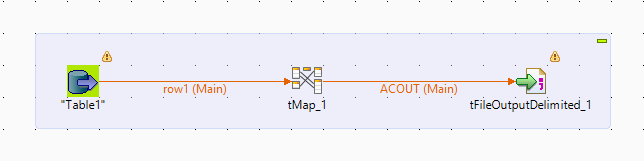
The job reads data from MySQL table and generate a CSV file.


The file name and file path can be set dynamically based on the context variables as shown in the above image.

Step 2: Upload files to S3 bucket

The next step is to create a single job to upload the generated files to S3 bucket. (JobName: UploadFile)


This job will upload the generated file to the provided S3 bucket.


The source file path and the target file path can be set dynamically based on the context variables.

Step 3: Copy the file data to Amazon Redshift tables

Third step is to create a single job to copy the file data to redshift tables. (JobName: CopyFile)


This job will copy the data from file into redshift table.


The copy query can be dynamically generated as show in the above image. The table name and file name can be dynamically set with the context variables.

Step 4: Call generate file job 20 times simultaneously 

Now we have all the three jobs that has to be run simultaneously more than 1 time. So how to call the job more than once simultaneously? Below is the example job (JobName: GenerateFileIntermediate)

The job contain 20 tRunJob component which call the same job with different context variables.


If you notice, each component has a parameter named TableName, which is a context variable, and that parameter value will be differ on each component.

Step 5: Call upload file job 20 times

Create a job that contains 20 tRunJob component and each component call the upload job. (JobName: UploadFileIntermediate)


Each component can contain different parameter value.


Each component has different value for parameter TableName as shown in above image.

Step 6: Call Copy job 20 times

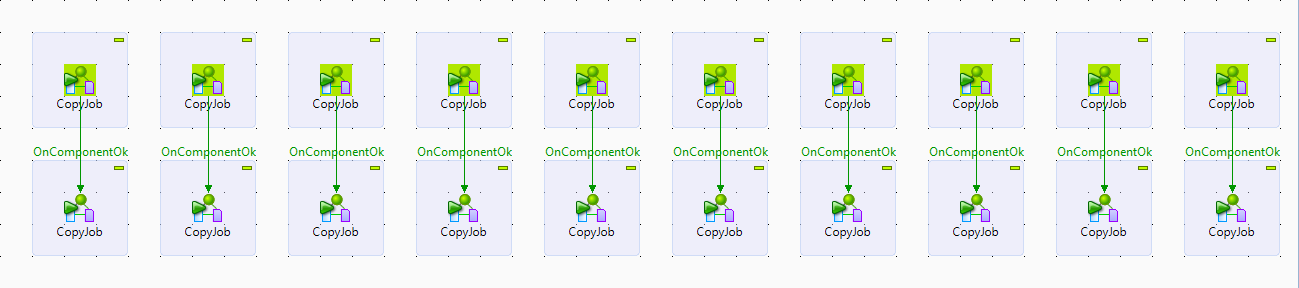
Create a job to call the copy job 20 times. (JobName: CopyIntermediate)

If you noticed, I made only 10 jobs run simultaneously and the other 10 jobs as sequential jobs. This is because, the 10 parallel job is based on the number of child core in your redshift cluster. If your cluster has only 6 then split the jobs as 6 rather than 10.


Each tRunJob component will have different parameter value as in the above image.

Step 7: Final job

Now create the final job which is the master job that invoke other jobs.


If you notice, the GenerateIntermediate job is called first, which in-turn call GenerateJob 20 times. When generate 20 files is finished, the UploadIntermediate job is invoked, which call UploadJob 20 times. Then CopyIntermediate job is called, which calls CopyJob 20 times.

Conclusion:

The concept here is that, separate job is created for generating file, uploading file to S3 and copying data to redshift tables. Then those each jobs are called multiple time with different parameters and finally the master job which calls the parallel job.

By this method we have achieved the efficient usage of parallel processing in Amazon S3 and Amazon Redshift.